
制作UMG的动态图片控件
发布时间:2019-01-08责任编辑:满帅 浏览:4349
UE4默认的图片控件只支持静态图。
资源只可以使用UTexture2D与PaperSprite两种格式。
虽然可以使用材质来实现动态效果,不过不如直接使用Flipbook来的方便。
下面上代码:
UCLASS()
class TEST_API UAnimatedImage : public UImage
{
GENERATED_BODY()
public:
UFUNCTION(BlueprintCallable, Category = Animation)
void Play();
UFUNCTION(BlueprintCallable, Category = Animation)
void Stop();
virtual void SynchronizeProperties();
UFUNCTION(BlueprintCallable, Category = "Appearance")
void SetPaperFlipbook(UPaperFlipbook* Flipbook);
UFUNCTION(BlueprintCallable, Category = "Appearance")
void SetBrushFromSprite(UPaperSprite* Sprite, int32 Width, int32 Height);
protected:
UPaperFlipbook* PaperFlipbook;
void TimerTick();
FTimerHandle TimerHandle;
UPROPERTY(EditAnywhere, BlueprintReadOnly, Category = Animation)
int32 CurrentFrame = 0;
UPROPERTY(EditAnywhere, BlueprintReadOnly, Category = Animation)
int32 TotalFrames = 0;
UPROPERTY(EditAnywhere, BlueprintReadOnly, Category = Animation)
int32 FramesPerSecond = 15;
};
void UAnimatedImage::Play()
{
if ( (!TimerHandle.IsValid()) && (IsValid(PaperFlipbook)) )
{
GetWorld()->GetTimerManager().SetTimer(
TimerHandle,
this,
&UAnimatedImage::TimerTick,
1.0f / FramesPerSecond,
true
);
}
}
void UAnimatedImage::Stop()
{
if (TimerHandle.IsValid())
{
GetWorld()->GetTimerManager().ClearTimer(TimerHandle);
}
}
void UAnimatedImage::SynchronizeProperties()
{
Super::SynchronizeProperties();
}
void UAnimatedImage::SetPaperFlipbook(UPaperFlipbook* Flipbook)
{
if (PaperFlipbook != Flipbook)
{
if (IsValid(Flipbook))
{
PaperFlipbook = Flipbook;
TotalFrames = PaperFlipbook->GetNumFrames();
FramesPerSecond = PaperFlipbook->GetFramesPerSecond();
CurrentFrame = 0;
}
}
}
void UAnimatedImage::SetBrushFromSprite(UPaperSprite* Sprite, int32 Width, int32 Height)
{
if (IsValid(Sprite))
{
const FSlateAtlasData SpriteAtlasData = Sprite->GetSlateAtlasData();
const FVector2D SpriteSize = SpriteAtlasData.GetSourceDimensions();
FSlateBrush TempBrush;
TempBrush.SetResourceObject(Sprite);
Width = (Width > 0) ? Width : SpriteSize.X;
Height = (Height > 0) ? Height : SpriteSize.Y;
TempBrush.ImageSize = FVector2D(Width, Height);
SetBrush(TempBrush);
}
}
void UAnimatedImage::TimerTick()
{
if (IsValid(PaperFlipbook))
{
UPaperSprite* tempSprite = PaperFlipbook->GetSpriteAtFrame(CurrentFrame);
if (IsValid(tempSprite))
{
SetBrushFromSprite(tempSprite, 0, 0);
CurrentFrame++;
if (CurrentFrame > TotalFrames - 1) CurrentFrame = 0;
}
else
{
CurrentFrame = 0;
}
}
}
使用方法:
编译后会在UMG中发现 这个控件。
这个控件。
将其拖入界面中,调用以下蓝图就可使用。
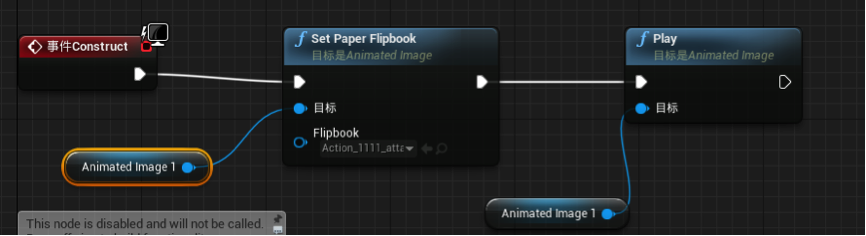
这样Animated Image里面的角色就会动啦。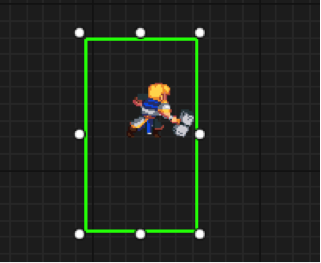
游戏开发组 供稿
 关注微信公众号
抵制不良游戏,拒绝盗版游戏。注意自我保护,谨防受骗上当。适度游戏益脑,沉迷游戏伤身。合理安排时间,享受健康生活。






 公安部备案号 37010102000609