
咔咔建站个性复选文本框
发布时间:2018-11-28责任编辑:满帅 浏览:1377
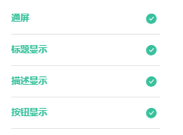
做成好看的文本框需要覆盖原有的文本框,把原有的隐藏,然后美化样式,如图:
1. 需要引用好看的图标;

2. 利用after和before美化点击前后的样式;
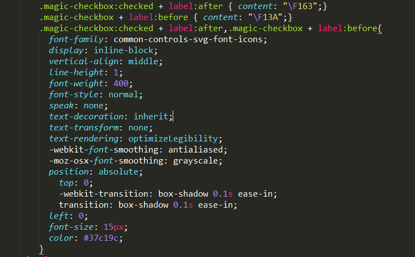
3. 内容,把input隐藏;

完整代码:
<!DOCTYPE html>
<html>
<head>
<meta charset="UTF-8">
<meta http-equiv="X-UA-Compatible" content="IE=edge,chrome=1">
<meta name="viewport" content="width=device-width, initial-scale=1.0">
<title></title>
<style type="text/css">
@font-face {
font-family: common-controls-svg-font-icons;
src: url(./fonticons.woff) format("woff");
}
.input-group{ margin: 20px; position: relative;}
.magic-checkbox:checked + label:after { content: "F163";}
.magic-checkbox + label:before { content: "F13A";}
.magic-checkbox:checked + label:after,.magic-checkbox + label:before{
font-family: common-controls-svg-font-icons;
display: inline-block;
vertical-align: middle;
line-height: 1;
font-weight: 400;
font-style: normal;
speak: none;
text-decoration: inherit;
text-transform: none;
text-rendering: optimizeLegibility;
-webkit-font-smoothing: antialiased;
-moz-osx-font-smoothing: grayscale;
position: absolute;
top: 0;
-webkit-transition: box-shadow 0.1s ease-in;
transition: box-shadow 0.1s ease-in;
left: 0;
font-size: 15px;
color: #37c19c;
}
</style>
</head>
<body>
<div >
<div>
<input type="checkbox" name="abc" value="一年级" id="in1" checked="checked" style="display:none;">
<label for="in1"></label>
</div>
</div>
</body>
<script src="jquery.min.js"></script>
<script>
$(function () {
$('magic-checkbox').click(function () {
$("input[name='abc']").each(function () {
if ($(this).attr("checked")) {
$(this).removeAttr("checked");
} else {
$(this).attr("checked", 'true');
}
});
});
});
</script>
</html>
项目设计组 供稿
 关注微信公众号
抵制不良游戏,拒绝盗版游戏。注意自我保护,谨防受骗上当。适度游戏益脑,沉迷游戏伤身。合理安排时间,享受健康生活。






 公安部备案号 37010102000609