
work-break: break-all和word-wrap: break-word有什么区别?
发布时间:2017-10-31责任编辑:朱明 浏览:3564
CSS中的work-break和word-wrap都是跟换行有关的,下面先来分别看看两种的用法。
1. work-break
word-break 指定了怎样在单词内断行。
word-break: normal
word-break: break-all
word-break: keep-all
/* Global values */
word-break: inherit;
word-break: initial;
word-break: unset;
值:
normal:使用默认的断行规则。
break-all:对于non-CJK (CJK 指中文/日文/韩文) 文本,可在任意字符间断行。
keep-all:CJK 文本不断行。 Non-CJK 文本表现同 normal。
2. word-wrap(overflow-wrap)
在CSS3中word-wrap也称为overflow-wrap,用来说明当一个不能被分开的字符串太长而不能填充其包裹盒时,为防止其溢出,浏览器是否允许这样的单词中断换行。
/* Keyword values */
overflow-wrap: normal;
overflow-wrap: break-word;
/* Global values */
overflow-wrap: inherit;
overflow-wrap: initial;
overflow-wrap: unset;
值:
normal:表示在正常的单词结束处换行。
break-word:表示如果行内没有多余的地方容纳该单词到结尾,则那些正常的不能被被分割的单词会被强制分割换行。
注意:稳定的谷歌 Chrome 和 Opera 浏览器版本支持这种新语法(overflow-wrap)。
3.work-break: break-all和word-wrap: break-word的区别?
例子:
Html:
<div>
The word-break CSS
<span>propertypropertyproperty</span>
specifies whether or not the browser should insert line breaks wherever the text would otherwise overflow its content box.
</div>
<div class="box break-all">
<p><b>word-break: break-all</b></p>
The word-break CSS
<span>propertypropertyproperty</span>
specifies whether or not the browser should insert line breaks wherever the text would otherwise overflow its content box.
</div>
<div class="box break-word">
<p><b>word-wrap: break-word</b></p>
The word-break CSS
<span>propertypropertyproperty</span>
specifies whether or not the browser should insert line breaks wherever the text would otherwise overflow its content box.
</div>
CSS:
p {
margin: 0;
}
.red {
color: red;
}
.box {
width: 150px;
border: 1px solid #d9d9d9;
padding: 5px;
margin: 10px;
float: left;
background: #fff;
}
.break-all {
word-break: break-all;
}
.break-word {
word-wrap: break-word;
}
效果:
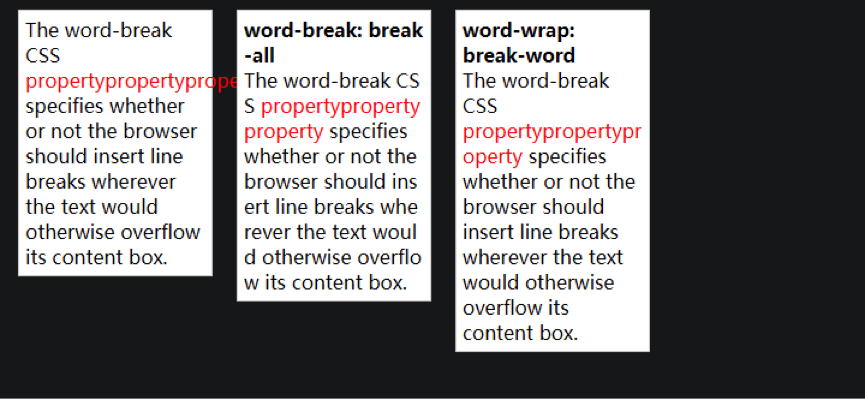
从上面的结果可以看到,同样是切割单词换行,但是word-break: break-all是会挤满整个剩余空间再换行,而word-wrap: break-word是会直接换行,后面留了一大片空白。
敬业工作室 供稿
 关注微信公众号
抵制不良游戏,拒绝盗版游戏。注意自我保护,谨防受骗上当。适度游戏益脑,沉迷游戏伤身。合理安排时间,享受健康生活。






 公安部备案号 37010102000609