
Cocos2d-x 触摸图片像素判断
发布时间:2017-01-24责任编辑:朱明 浏览:1936
前些时候想用不规则按钮,按钮的图片是一张矩形的png图片,很可能图片的实际有效的显示内容只占整个png图片的很小一部分,剩下的大部分都是png图片的透明区域,我们想把这部分透明区域过滤掉,实现一个触摸到有真实像素时按钮才响应的效果。
上网找了些资料,有继承Button的,也有使用图片的,判定的时候根据触摸点的位置是否有像素来筛选。在这里分享一下判断是否点击到像素的方法。
HelloWorldScene.h
class HelloWorld : public cocos2d::Layer
{
public:
HelloWorld();
~HelloWorld();
static cocos2d::Scene* createScene();
virtual bool init();
CREATE_FUNC(HelloWorld);
virtual bool onTouchBegan(Touch *pTouch, Event *pEvent);
virtual void onTouchMoved(Touch *touch, Event *unused_event);
virtual void onTouchEnded(Touch *touch, Event *unused_event);
EventListenerTouchOneByOne* touchListener;
private:
RenderTexture* _renderTexture;
Sprite* _spr;
};
HelloWorldScene.cpp
bool HelloWorld::init()
{
if ( !Layer::init() )
{
return false;
}
auto winsize = Director::getInstance()->getWinSize();
touchListener = EventListenerTouchOneByOne::create();
touchListener->setSwallowTouches(true);
touchListener->onTouchBegan = CC_CALLBACK_2(HelloWorld::onTouchBegan, this);
touchListener->onTouchMoved = CC_CALLBACK_2(HelloWorld::onTouchMoved, this);
touchListener->onTouchEnded = CC_CALLBACK_2(HelloWorld::onTouchEnded, this);
this->_eventDispatcher->addEventListenerWithSceneGraphPriority(touchListener, this);
auto _sNameN = "hat.png";
this->_spr = Sprite::create(_sNameN);
this->_spr->setPosition(Vec2(400, 200));
this->addChild(this->_spr, 1);
this->_renderTexture = RenderTexture::create(this->_spr->getContentSize().width, this->_spr->getContentSize().height, Texture2D::PixelFormat::RGBA8888);
this->_renderTexture->ignoreAnchorPointForPosition(true);
this->_renderTexture->setPosition(Vec2(400, 200));
this->_renderTexture->setAnchorPoint(Point::ZERO);
this->addChild(this->_renderTexture, 0, 1);
return true;
}
bool HelloWorld::onTouchBegan(Touch *pTouch, Event *pEvent)
{
bool isTouched = false;
Point touchPoint = pTouch->getLocationInView();
Point glPoint = Director::sharedDirector()->convertToGL(touchPoint);
if (this->_spr->boundingBox().containsPoint(glPoint)) {
Color4B color4B = { 0, 0, 0, 0 };
Point nodePos = this->_spr->convertTouchToNodeSpace(pTouch);
unsigned int x = nodePos.x;
unsigned int y = this->_spr->getContentSize().height - nodePos.y;
Point point = this->_spr->getPosition();
//开始准备绘制
this->_renderTexture->begin();
//绘制使用的临时精灵,与原图是同一图片
Sprite* pTempSpr = Sprite::createWithSpriteFrame(this->_spr->displayFrame());
pTempSpr->setPosition(Vec2(pTempSpr->getContentSize().width / 2, pTempSpr->getContentSize().height / 2));
//绘制
pTempSpr->visit();
//结束绘制
this->_renderTexture->end();
//通过画布拿到这张画布上每个像素点的信息,封装到Image中
Image* pImage = this->_renderTexture->newImage();
//获取像素数据
unsigned char* data_ = pImage->getData();
unsigned int *pixel = (unsigned int *)data_;
pixel = pixel + (y * (int)pTempSpr->getContentSize().width) * 1 + x * 1;
//R通道
color4B.r = *pixel & 0xff;
//G通道
color4B.g = (*pixel >> 8) & 0xff;
//B通过
color4B.b = (*pixel >> 16) & 0xff;
//Alpha通道,输出查看alpha值
color4B.a = (*pixel >> 24) & 0xff;
log("alpha = %d", color4B.a);
if (color4B.a > 50) {
isTouched = true;
}
else {
isTouched = false;
}
}
return isTouched;
}

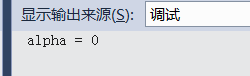
当点击中间和周围没有像素的位置时,打印出的log显示
当点击有像素的位置时,打印出的log显示
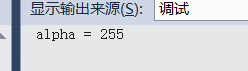
点击空白区域时透明通道是0,点击有像素的位置时会显示大于1-255;
春秋工作室 供稿
 关注微信公众号
抵制不良游戏,拒绝盗版游戏。注意自我保护,谨防受骗上当。适度游戏益脑,沉迷游戏伤身。合理安排时间,享受健康生活。






 公安部备案号 37010102000609